How RideMate works
Students going the same way share the ride and split the cost. Everyone is a verified student, and you pay in the app.
For riders: book a seat in three steps
1
Find a ride
Search by city and date, or browse all rides. Nothing yet? Tap Notify Me and we tell you when one is posted.
2
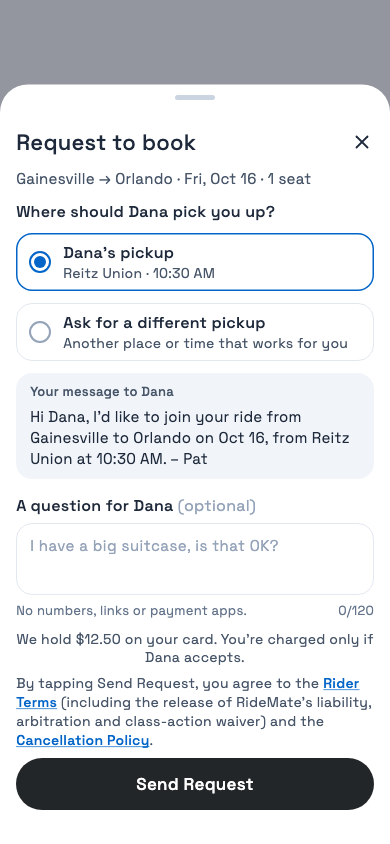
Book your seat
See the price per seat first. Tap Book, or Request to Book when the driver approves each rider. You’re charged only if the driver accepts.
3
Ride and rate
Meet at the pickup, share your trip with family, and rate each other after the ride.
For drivers: post a ride you’re taking anyway
1
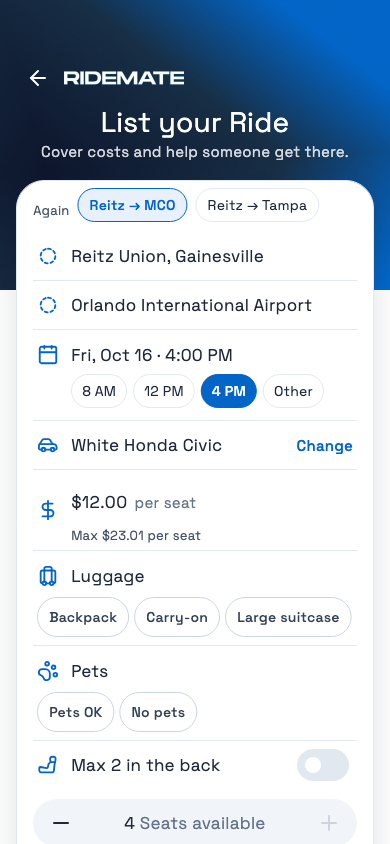
Post your ride
Route, time, seats and a price per seat under the cap.
2
Take riders
Riders book at once, or you approve each request.
3
Get paid back
Stripe sends them 24–48 hours after the ride, minus card fees.
Money, in short
The full rules are in the Cancellation Policy.
Price per seat
Set by the driver, capped at the trip’s cost at the IRS rate of $0.76 a mile, split by the seats.
Paying
In the app, by card, Apple Pay or Google Pay.
Plans change?
Driver cancels
You get everything back
Verified students only
School email and student ID checked by our team. Drivers also add their license.
.webp)
Ready to ride?
Get RideMate and book or post your first ride in minutes.


Get the App
.edu & ID-verified students • No surge pricing • Secure in-app payments
.webp)

One ride, two wins. Rides home with verified UF students.
© 2026 RIDE MATE LLC
Not affiliated with the University of Florida.